


Plan your day.
Your checklist, diary and follow-ups. Fit tasks into confirmed free time.
Practice operating system for healthcare teams
Bring tasks, practice knowledge and booking insights together. Give follow-ups an owner, keep guidance current and review what improves.
Preview Ask Clini and key features Built by the team behind

Works beside Cliniko and Nookal. Patient records and clinical notes stay in your practice software.
Design partners
Shaped with seven working practices, including Adnan Ali Asger at Reflex Physio and Andrew Wallis at MOG Sports Medicine and The Hip & Groin Clinic. Hawker Place joins from Canberra.
CliniBase at a glance
For physiotherapy, allied health and healthcare teams.
From practice insight to improvement
Your checklist, diary and follow-ups. Fit tasks into confirmed free time.
Ask Clini about practice guidance and open the approved source.
Turn non-clinical process recordings into reviewed guides and training.
A practical first step
Inside CliniBase
Explore six fictional app highlights.
Ask about a practice guide, procedure, your own work or a recorded process owner.
Read the answer and see which approved instruction supports it. Missing evidence should stay an open question.
Inspect the cited passage, then open the current record in your workspace before acting.
Access follows your role and practice settings. Answers use current records you can access; conversations stay private.
A clear question about everyday practice work.
Select “Show example answer” below to continue.Daily emails
In preparationMorning: open work and today’s priorities. Evening: progress against that list and what remains.
Extra completions are separate. Moved or cancelled tasks remain unfinished. Details stay behind secure links.
2 high priority · 3 due today · 1 overdue
Review your priorities2 still open · 1 extra task completed
Plan the next stepEveryday tools
Find guidance you can access. Preview a supported task change, then confirm. Owners control access and activity questions.
Set task estimates, find gaps that fit and plan the work. PMS bookings stay unchanged.
Add files, screenshots or notes to Practice Hub. Review editable AI drafts and flagged conflicts.
Turn meeting decisions into Tasks & reviews with an owner and due date. Keep patient details out.
Share announcements, mention colleagues and link Team Updates to tasks or procedures. Bring follow-ups into Today.
Find approved Practice Hub guides and Procedures & training. Assign training linked to the approved version; track acknowledgements.
Use Reviews & handover for changed procedures and open work. Practice Assurance flags overdue work; handover packs preserve context.
Practice activity shows cancellations, missed appointments, rebooking gaps and appointment types by practitioner or location. Investigate in Cliniko or Nookal; assign follow-up in CliniBase.
Explain booking trends using approved practice context. Review suggestions and turn your decision into assigned work.
Second Brain
Approved knowledge stays with the practice as roles change. Your AI helper uses only work you can access.
Private tasks stay separate from team and management work.
Approved guides, training, Library files and decisions form the shared practice knowledge base.
Find guidance and earlier work you can access.
Inspect sources and control what AI may use.You stay in control. Confirm supported task changes. Procedures keep independent approval; PMS bookings and clinical records stay unchanged.
Ask Clini
Find approved guidance or organise a task from your workspace.
Try “Create task Check stationery tomorrow” or ask about a practice guide.
Open cited sources. Check the task, date, owner and proposed change.
Confirm proposed task changes. Saved actions appear in task history.
When enabled, owners and managers can ask about saved monthly activity and preview follow-up tasks.
Owners control access to supported actions. Keep patient and confidential staff information out of requests.
Screen recording to procedure and training
Create reviewed instructions and training from a non-clinical recording.
Capture admin work without patient, clinical or confidential staff information.
AI creates editable instructions for review.
A different authorised reviewer approves the current version.
Assign training linked to the approved version and set the next review date.
Outcomes & ROI
Check whether follow-ups were completed on time, reviews were faster and training was acknowledged. Time freed up is shown separately from cash savings.
Task, procedure and training activity creates a fixed starting point for comparison.
Compare periods with enough data. Check each result’s dates and records.
Use time samples, work frequency and labour costs to value time freed up. Record costs and confirmed benefits for financial ROI.
Outcomes shows observed change. It does not prove CliniBase caused the change.
A practical starting point
Choose your setup. Start with the workflow costing you the most time.
PMS + practice operating system
Scroll across to compare.
| What each system is for | PMSYour PMSCliniko or Nookal today | WORKSPACECliniBasePractice operating system |
|---|---|---|
| Core record | Patient records, appointments and clinical notes | Tasks, procedures, training, handovers and improvement |
| Daily work | Appointments and the patient record | Owners, follow-ups and clear next steps |
| Team coordination | Check the communication tools in your PMS | Announcements, work-linked updates and owned handovers |
| Practice memory | Patient and appointment history | Permission-filtered Second Brain and approved practice knowledge |
| Team learning | Care and booking workflows | Current procedures, training linked to the approved version and review dates |
| Connection | Source of truth for care records | Read-only operational signals; no write-back |
Patient records, clinical notes and patient-specific instructions stay in your PMS. CliniBase cannot change bookings or clinical records.
AI and practice work
Scroll across to compare.
| How work continues | CHATGeneral AI conversation | WORKSPACECliniBase |
|---|---|---|
| Context | Conversation and supported connected sources | Permission-filtered practice knowledge and linked work |
| Typical use | General brainstorming, writing and exploring ideas | Practice answers, guides, training and owned tasks |
| Follow-through | Depends on the tool, integrations and plan | Confirmed task actions, owners, due dates, review history and current guidance |
| Control | Controls vary by tool, settings and connected actions | Access controls, confirmed actions and independent approval |
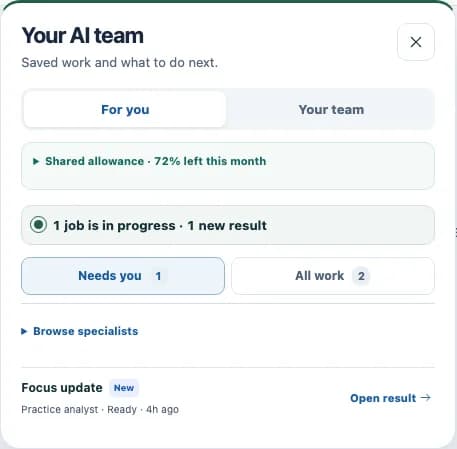
Your AI team, in view
See saved AI work, its status and results. Review or retry in the original workflow.
Six kinds of help cover insights, improvements, planning, procedures, knowledge and prompts.
Opening this panel starts no AI work and uses no allowance. You decide what to use.
A clearer way to work
Capture know-how, agree the process and follow through.
Follow-through
Reception checks the shared handover list at opening and passes unresolved items to the manager.
This is a fixed fictional example. In your workspace, explain the job in your own words or select reviewed material.
What’s next
Planned integrations — not yet available. Subject to provider access and validation.
01Finance

Xero
Review read-only financial signals; assign reconciliation work.
02Claiming
LanternPay
Follow supported claim exceptions and settlements through to resolution.
03Developer tools
Developer API
Developer preview: selected knowledge reads and drafts for human review. API access awaits validation.
Read access + draft contributions · Non-clinical
Use CliniBase: Get practice answers, create guides and training, and assign tasks with due dates.
Already working in an AI tool? Planned connections would let you use approved practice knowledge and submit drafts for review in CliniBase.
Contribute: Draft guides, procedures, training and team updates; propose tasks and submit reference material.
 ChatGPT
 Claude
 Gemini
 Copilot
 Grok
Grok Perplexity
ChatGPT Dots: OpenAI’s always-on autonomous AI agents can work in the background 24/7 in the cloud, even after you close the app. A planned CliniBase connection could prepare non-clinical drafts for your team to review.
Guides and training need independent approval. People confirm tasks and posts in CliniBase. Connected tools would not publish or change permissions. No patient records, clinical notes or sensitive staff information.
Connection options vary by provider and need validation. Product names and logos belong to their respective owners.
The practical details
A shared workspace for tasks, updates, guides, training and handovers. It reads supported Cliniko and Nookal appointment data. Your practice management system (PMS) keeps bookings, patient records and clinical notes; CliniBase cannot change them.
Ask about guidance, your work or process owners, with sources to check. Preview and confirm supported task changes: create, edit, plan, complete or reopen. Owners and managers can ask about saved monthly activity when enabled. Conversations stay private; role and settings control access. Keep requests operational.
Authorised editors add files, screenshots, recordings or notes to Practice Hub. An owner or manager checks sources before AI drafts a linked guide and flags gaps. Your team edits it; a different authorised reviewer approves it.
Practice memory: approved guidance and work you can access. Inspect the sources your AI helper may use. It is not a patient record.
Keep a private, non-identifying task or assign shared operational work with an owner and due date. Patient details and clinical instructions stay in your PMS.
See cancellations, missed appointments and lower rebooking: patterns to investigate, not revenue figures or dollars lost. Activity capacity metrics are supported for Cliniko, not currently Nookal.
Owners and managers can export accessible practice records and handover packs. Authorised users can export audit history and reports. Downloads reflect your access and records at that time.
Owners and managers can review booking activity by practitioner and overdue work. Clinicians see their own accessible work. These figures do not assess clinical quality or rank staff.
CliniBase starts building a baseline automatically from task, procedure and training activity. Time samples, work frequency and labour costs value time freed up. Financial ROI needs recorded costs and confirmed benefits. Time freed up is shown separately from cash savings. Observed change does not prove causation.
Background summaries can refresh automatically. You confirm Ask Clini task changes. Guides, procedures and training need independent approval. Planned AI connections could submit drafts for review; publishing and permissions stay in CliniBase. Bookings and clinical records stay in your PMS.
Sydney, Australia. Browser connections use HTTPS; sensitive integration credentials and private source files are encrypted at rest. Role and practice controls limit access.
Not yet. Xero, LanternPay, the developer API and AI connections depend on provider support and validation. Cliniko and Nookal are the current read-only connections.